
Data Science Skills
My Master’s degree is quickly coming to an end, so now is the time to start my job search. It’s my goal to find a position as a data scientist. (Please hire me.)
I had an idea that if I wanted to become a data scientist, I should find out what skills are most useful and desired in the field, and then work on my proficiency in those tools. That idea sprouted into this project: mining data scientist job postings to find the most frequent required skills. I mined the job postings using Python libraries requests and BeautifulSoup. I created visualizations of the desired qualifications using matplotlib.
The source code for my project can be found on my Github
Mining Data
I divided the mining process into two functions: collecting the job links and collecting the job data. More discussion follows below.
Collecting Links
I mined the job posting data from Indeed.com. To do this, we must first learn a little about the HTML structure of Indeed, so we can find the data elements we want. Let’s take a look at the screenshot below.
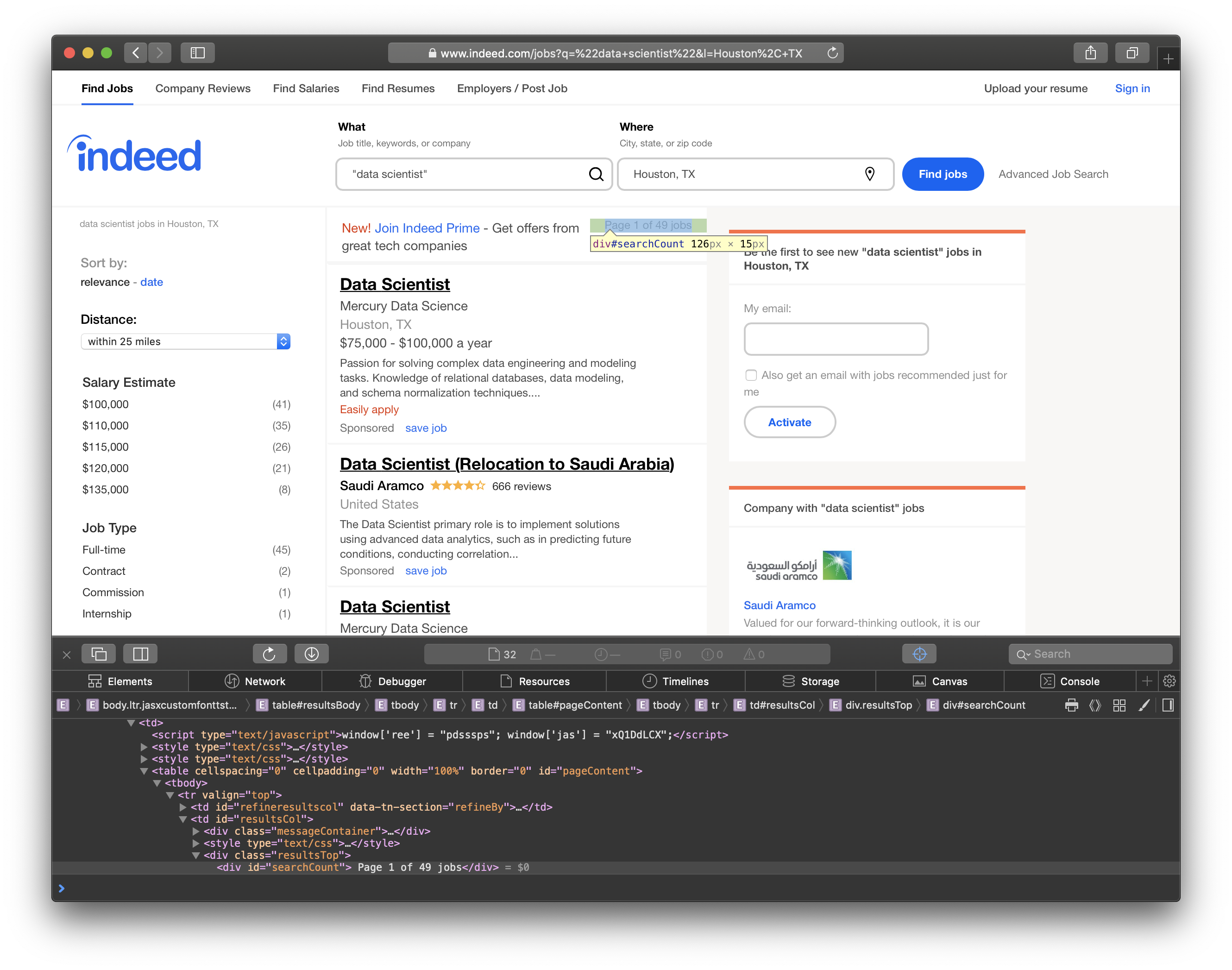
The highlighted text contains the number of jobs found in the city, and it is included in <div id="searchCount">. We’ll need this info to determine how many pages we should traverse.
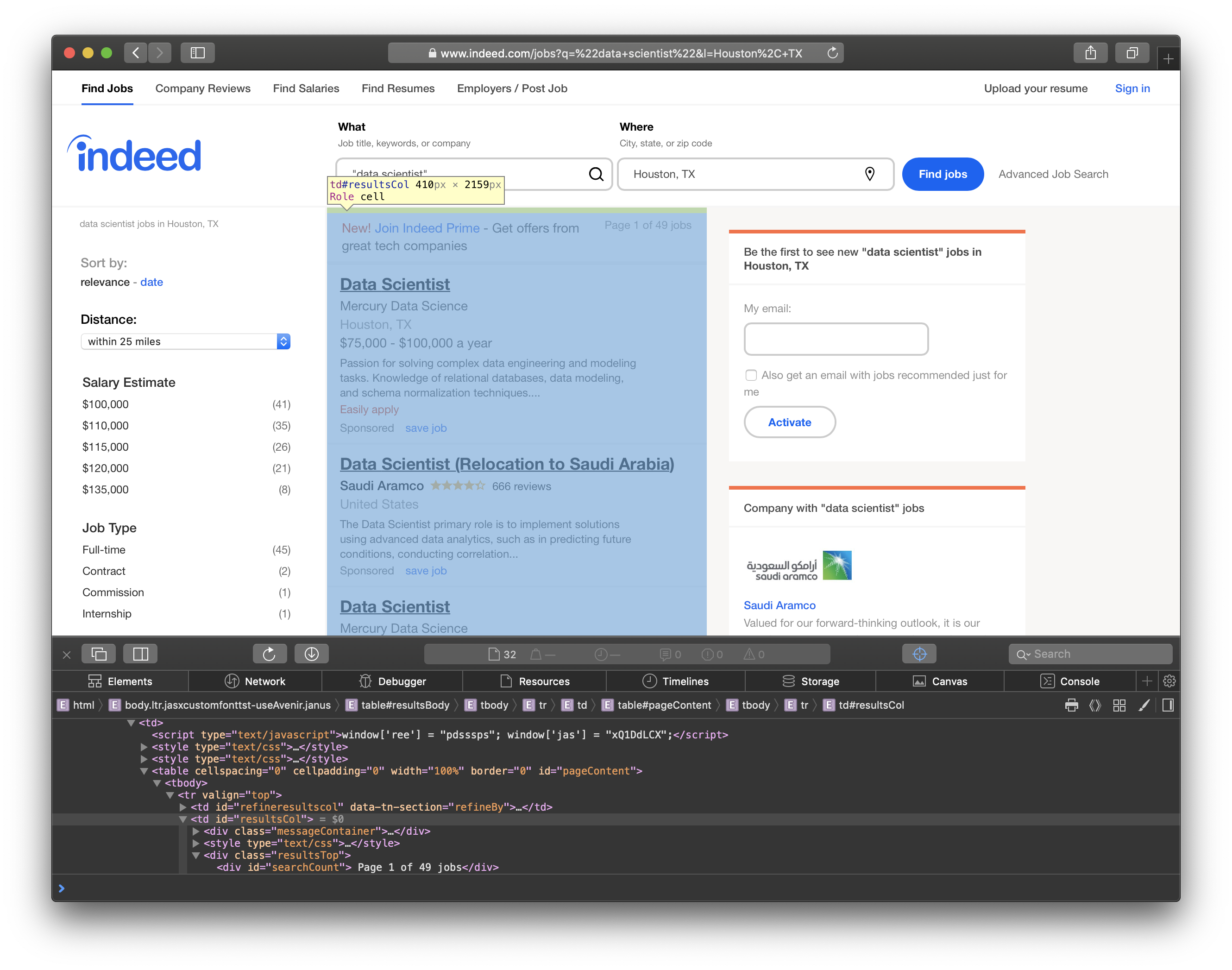
In this screenshot, you can see the job results are listed in <td id="resultsCol">.
Finally, we can see that the individual job titles are in <h2 id="jobtitle">. We’ll go through the table and grab each link for more information about the jobs.
So, how do we actually get the information we want? The answer is python libraries requests and BeautifulSoup. requests allows us to format the request parameters in a python dictionary which makes sending http requests incredibly simple. In an attempt to not overwhelm (DDOS) their servers, I sleep for 1 second after every request. In the code snippet below, I send a request for the job and location supplied in the parameters. Then, I use BeautifulSoup to parse the response’s HTML content. Notice we search for the elements that I highlighted in the screenshots above. I simply append the links to a list for the next step of the mining.
def get_links(job, location):
    request_data = {"q":job, "l":location, "limit":jobs_per_page, "start":0}
    #get request
    response = requests.get(base_url+"jobs", params=request_data)
    #create soup so we can parse the html
    soup = BeautifulSoup(response.content, "html.parser")

    links = []
    #grab the number of pages from search result "Page x of y jobs"
    num_pages = soup.find(id="searchCount").get_text()
    print(num_pages)
    # get the ceiling of the num of jobs / jobs per page
    num_pages = math.ceil(int(num_pages.split()[3]) / jobs_per_page)

    for i in range(num_pages):
        request_data = {"q":job, "l":location, "limit":jobs_per_page, "start":i*jobs_per_page}
        #get request
        response = requests.get(base_url+"jobs", params=request_data)
        print(response.url)
        soup = BeautifulSoup(response.content, "html.parser")

        titles = soup.find(id='resultsCol') #grab the results column for all the job listings
        for title in titles.find_all('h2', attrs={"class":"jobtitle"}):
            link = title.find('a').get("href") #find the reference link for the job post

            links.append(link)
        time.sleep(1)

    links = list(set(links))
    return links
Collecting Data
Now that we have a list of all the job links, let’s figure out how we can mine the data we need for each job. For each job, I collected the job title, company, and the content of the job posting. The HTML elements are shown in the screenshots below.
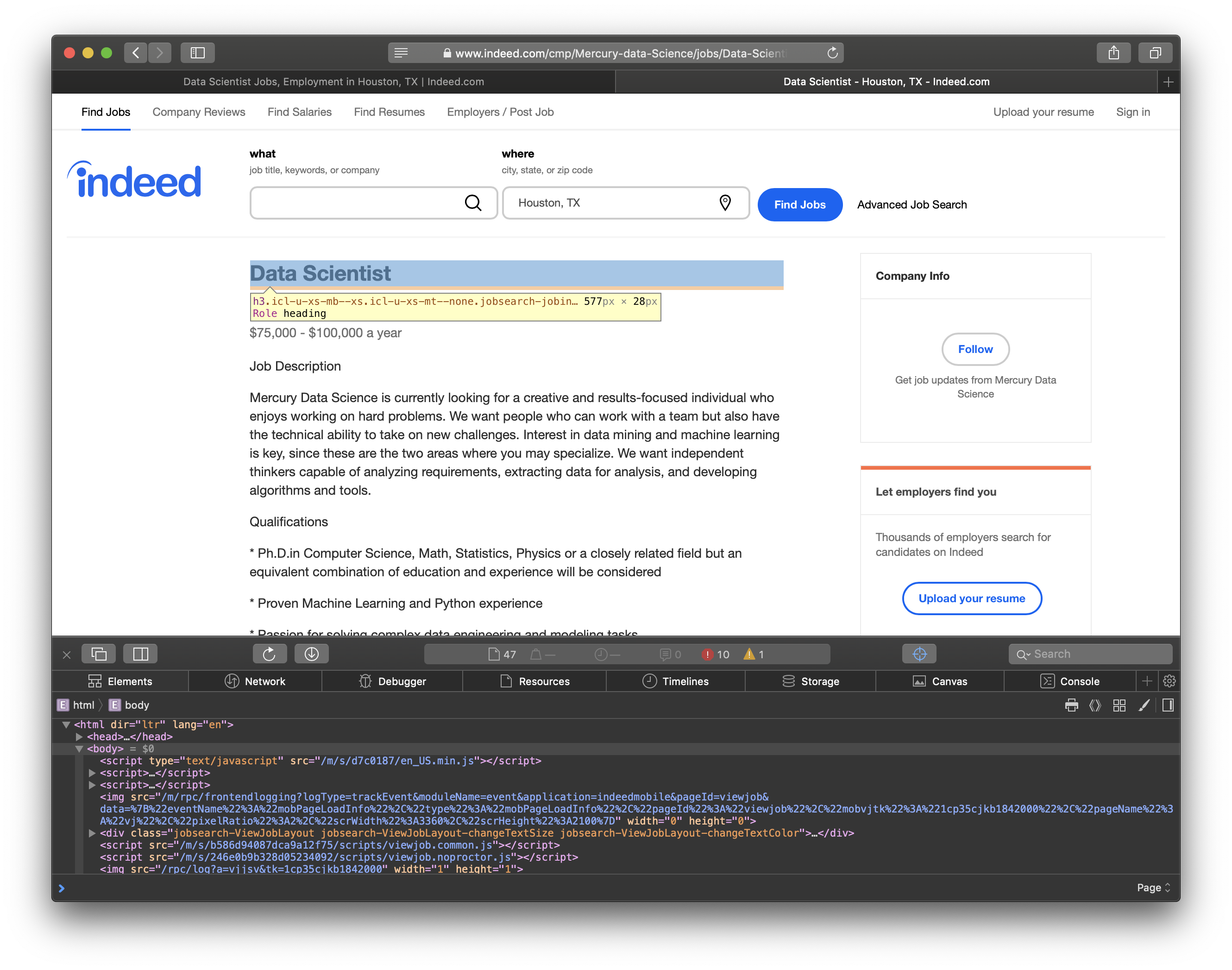
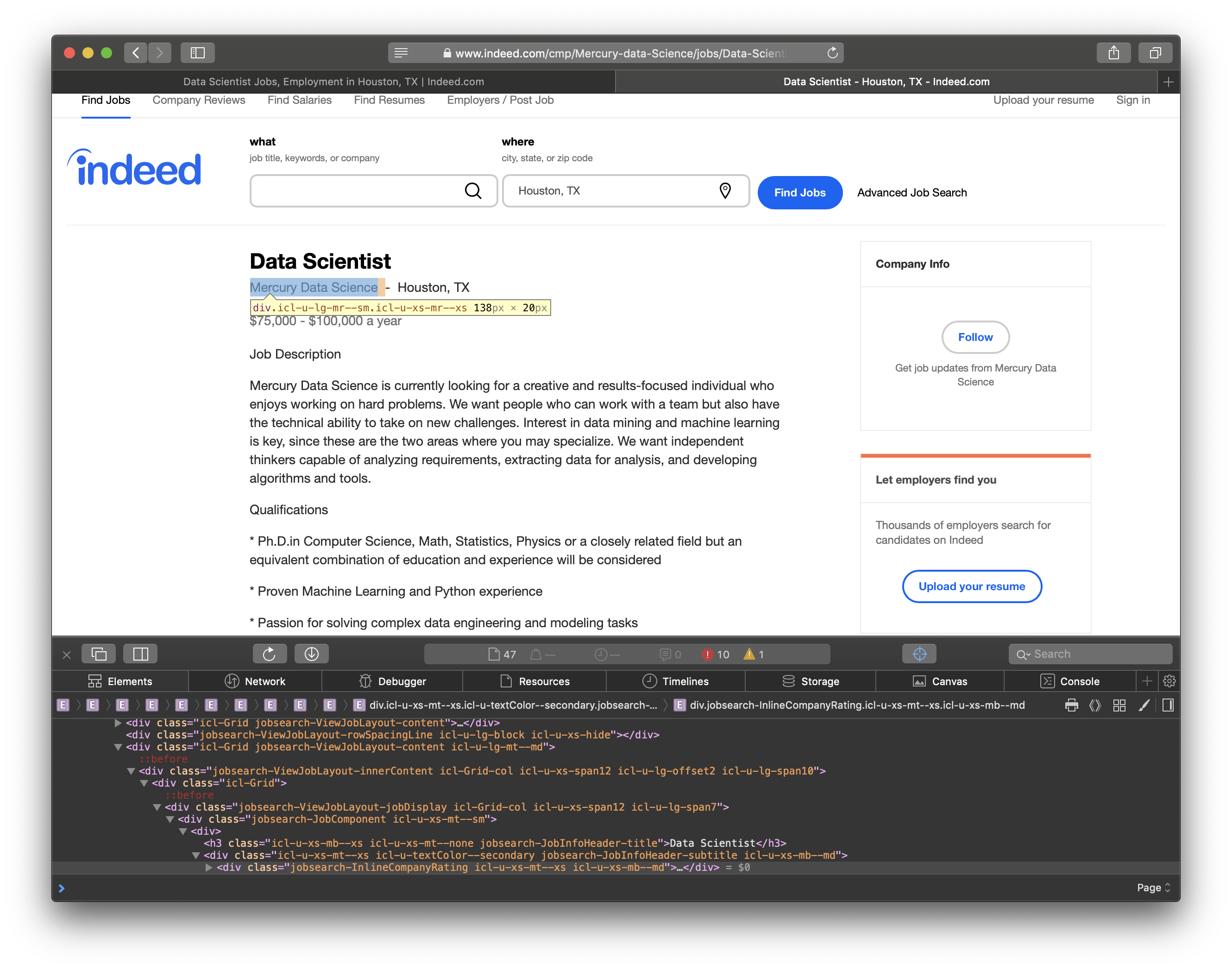
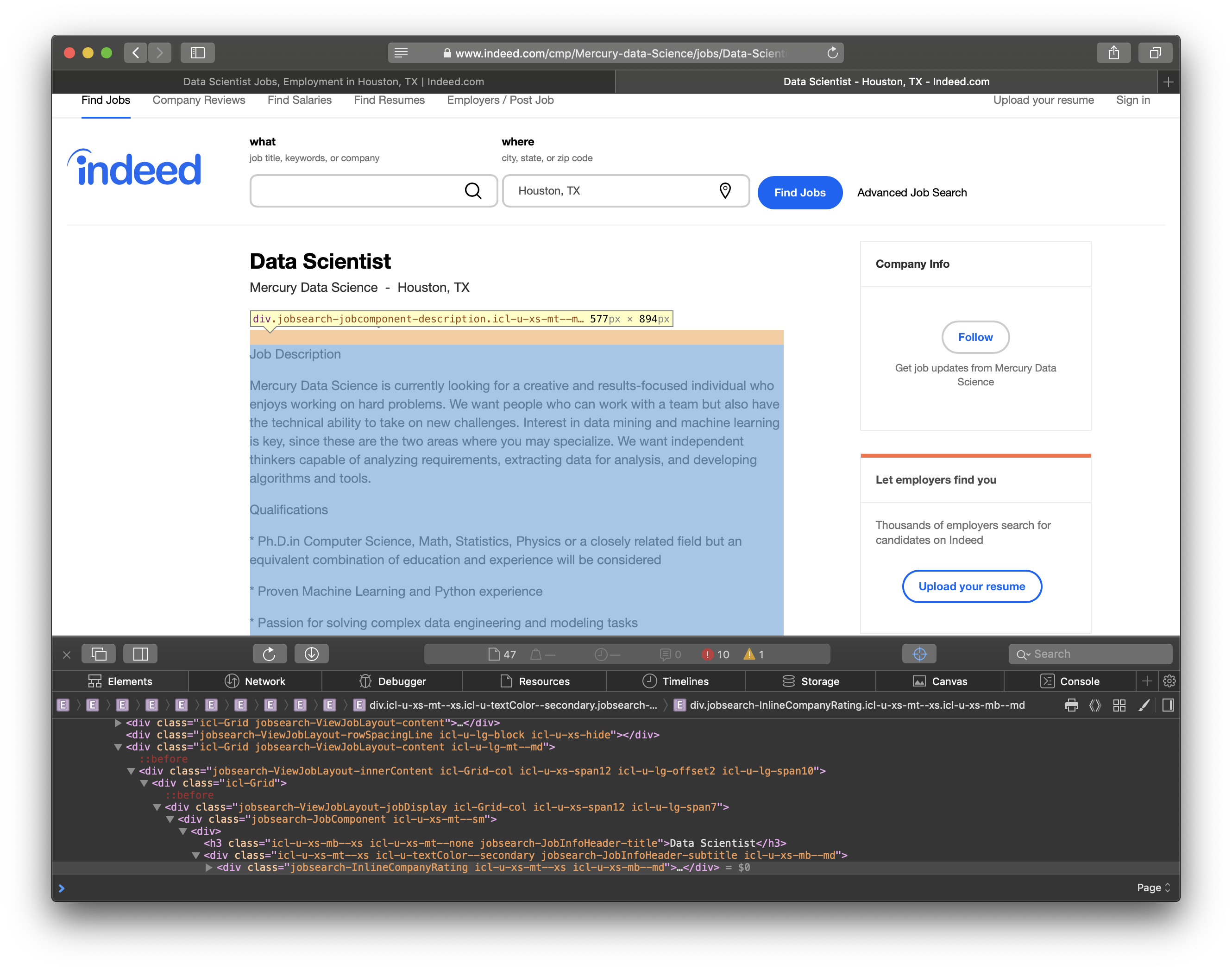
BeautifulSoup allows us to search for elements by their css class which is what I had to do to scrape the content from the site. After I mined the data, I needed to clean up the job summary. I used nltk.tokenize.word_tokenize to split the summary in to individual words. Then, I filtered out the stopwords from nltk.corpus. Stopwords are words that don’t add much meaning for my purpose such as: me, you, us, did, not, etc. The script to download jobs from a list of links follows.
#downloadJobs pulls all relevant job listings for the set of links and saves them at file_path
def download_jobs(links, location, file_path):
    jobs = []
    i=1 #keep track of loop for printing
    for link in links:
        print("Getting Job Posting " + str(i))
        i+=1
        #send get request to the specfic job link
        response = requests.get(base_url+link)
        url = response.url
        job = BeautifulSoup(response.content, "html.parser")
        print(url)
        #stop words to remove
        stop_words = nltk.corpus.stopwords.words('english')
        #sometimes the http request breaks so we try until we succeed
        giveup=0
        while True:
            #use a try because some responses get corrupted during transmission
            try:
                #job title
                title = job.find("h3", attrs={"class":"icl-u-xs-mb--xs icl-u-xs-mt--none jobsearch-JobInfoHeader-title"})
                title= title.get_text(separator="\n")
                #company info
                company = job.find("div", attrs={"class":"icl-u-lg-mr--sm icl-u-xs-mr--xs"})
                company= company.get_text()
                #grab the content and split it in to words
                content = job.find("div", attrs={"class":"jobsearch-JobComponent-description icl-u-xs-mt--md"})
                content= content.get_text(separator="\n")
                #split in to words from the text using nltk tokenize
                content = nltk.tokenize.word_tokenize(content)
                #remove stop words which dont add any meaning
                content = [word for word in content if word not in stop_words]
            except:
                print("Trying again")
                #send a new requestw
                response = requests.get(base_url+link)
                url = response.url
                job = BeautifulSoup(response.content, "html.parser")
                time.sleep(1)
                #we don't want to get stuck in a loop forever
                if giveup == 5:
                    break
                giveup +=1
                continue
            break
        #add job to list, we set the content because I only care about existence not frequency
        jobs.append({"url":url, "title":title, "company":company, "content":list(set(content))})
        time.sleep(1)

    #convert the dictionary to a pandas dataframe and save as a csv
    job_df = pd.DataFrame.from_dict(jobs)
    job_df.to_csv(location+".csv")
Analyzing Data
I was interested in the most common programming languages, analysis tools, frameworks for distributed computing, and database languages.
To start the analysis, let’s convert the job summaries to integers counts. I used a Counter class which is a specialized dictionary for counting hashable objects. Then, I filtered out the specific words I was looking for.
def get_word_counts(top_cites):
    word_counts = Counter()
    num_jobs = 0
    for city in top_cites:
        # create a dataframe from the mined data
        job_df = pd.read_csv(city+".csv", encoding="ISO-8859-1")
        for summary in job_df["content"]:
            # keep track of number of jobs to convert to percentage
            num_jobs += 1
            for word in summary.split():
                # remove punctuation and make all words lower case
                clean_word = word.translate(str.maketrans("","",string.punctuation)).lower()
                word_counts[clean_word] += 1
    return word_counts, num_jobs
I created filters for the topics that I was interested in.
program_lang_filter = ['Python', 'R', 'Java', 'C', 'Ruby', 'Perl', 'Matlab', 'JavaScript', 'Scala']
analysis_filter = ['Excel', 'Tableau','SAS', 'SPSS','D3']
distributed_filter = ['Hadoop', 'MapReduce', 'Spark', 'Pig', 'Hive', 'Shark', 'Oozie', 'ZooKeeper', 'Flume', 'Mahout']
database_filter = ['SQL', 'NoSQL', 'HBase', 'Cassandra', 'MongoDB']
lib_filter = ['Tensorflow', 'Matplotlib', 'Scikit', 'Numpy', 'Pandas', 'Keras', 'NLTK', 'Pyspark']
Then, I simply created new dictionaries for each filter list, and converted it to a pandas dataframe.
def filter_words(word_counts, num_jobs, filter):
    filtered_words = {}
    # select words from the counts that we want
    for word in filter:
        filtered_words[word]= word_counts[word.lower()]
    # create dataframe from dictionary and convert raw counts to percentages
    filtered_df = pd.DataFrame.from_dict(filtered_words, orient="index")
    filtered_df.columns = ["Percent"]
    filtered_df["Percent"] = filtered_df["Percent"]/num_jobs*100

    return filtered_df
To visualize the data, I used matplotlib.
def plot_top(df, title):
    #use the seaborn chart styling
    plt.style.use("seaborn")
    #name column to Jobs
    df.columns=["Jobs"]
    #sort by count in column Jobs
    df= df.sort_values(by="Jobs", ascending=False)
    top=df.plot(kind='bar')
    #set title and y label
    plt.title(title)
    plt.ylabel("Percentage")
    #label each bar with percentage value
    for idx, label in enumerate(list(df.index)):
        for acc in df.columns:
            value = np.round(df.ix[idx][acc],decimals=2)
            top.annotate(value,
                        (idx, value),
                         xytext=(0, 0),horizontalalignment="center",
                         textcoords='offset points')
    plt.show()
City by City
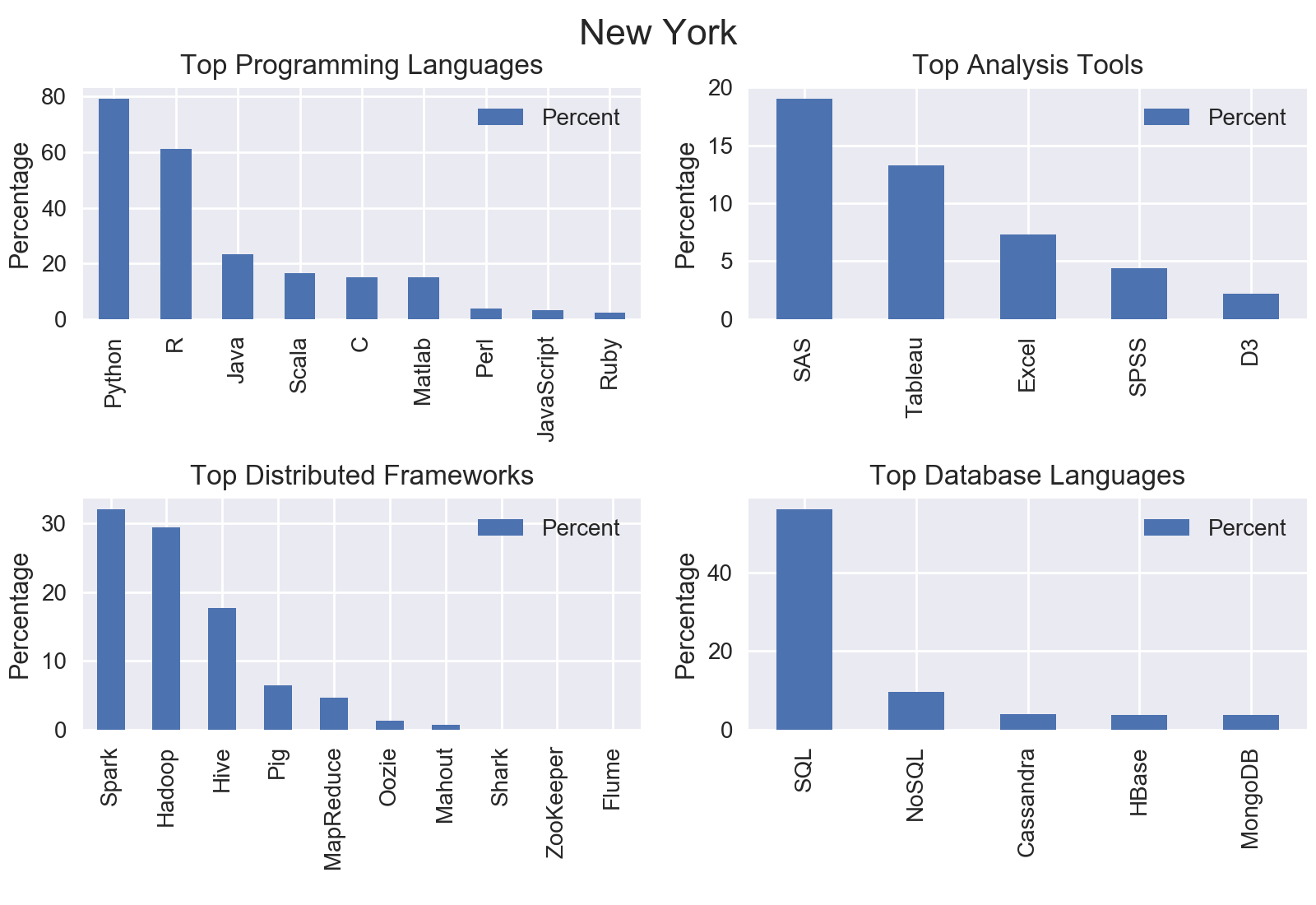
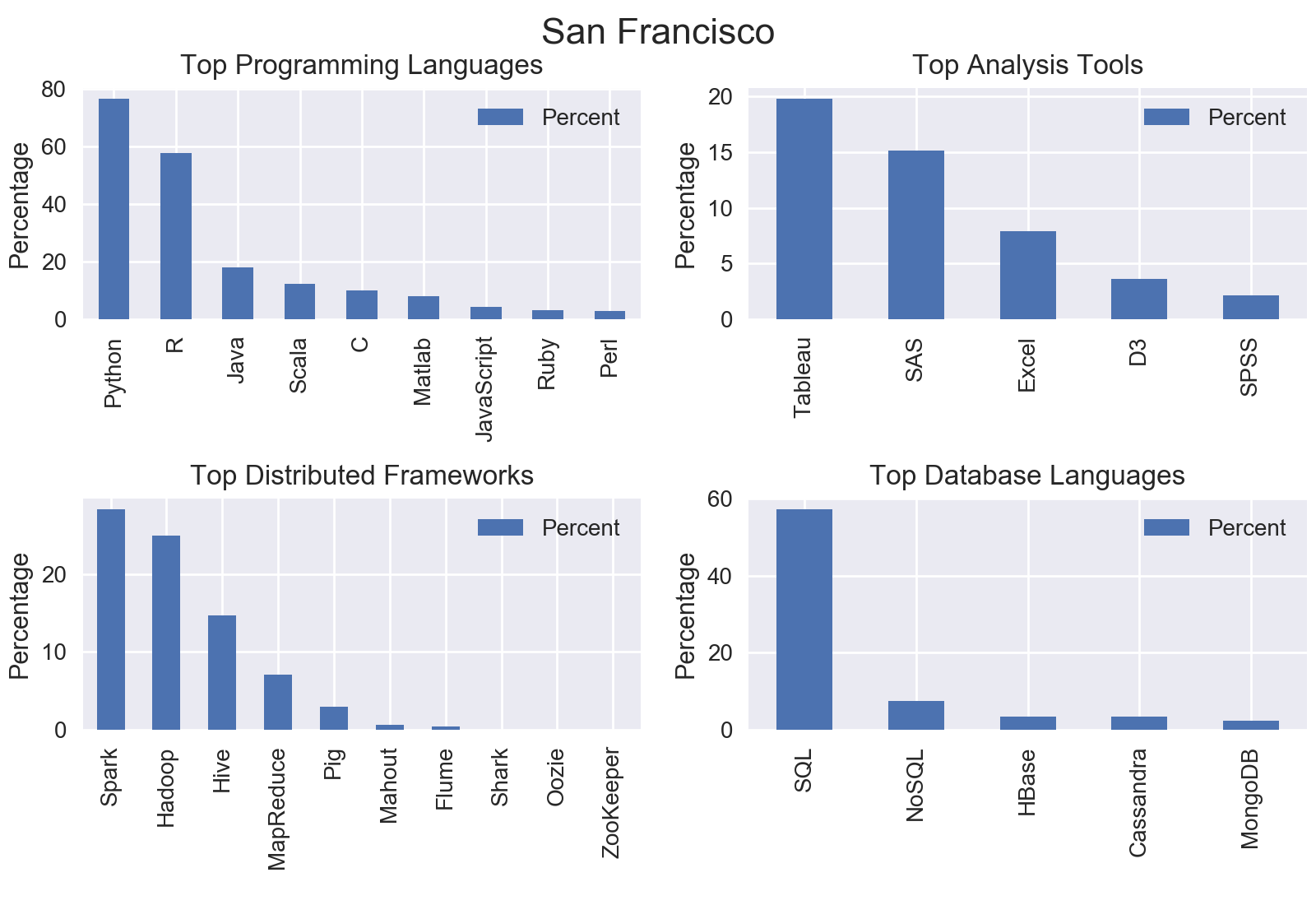
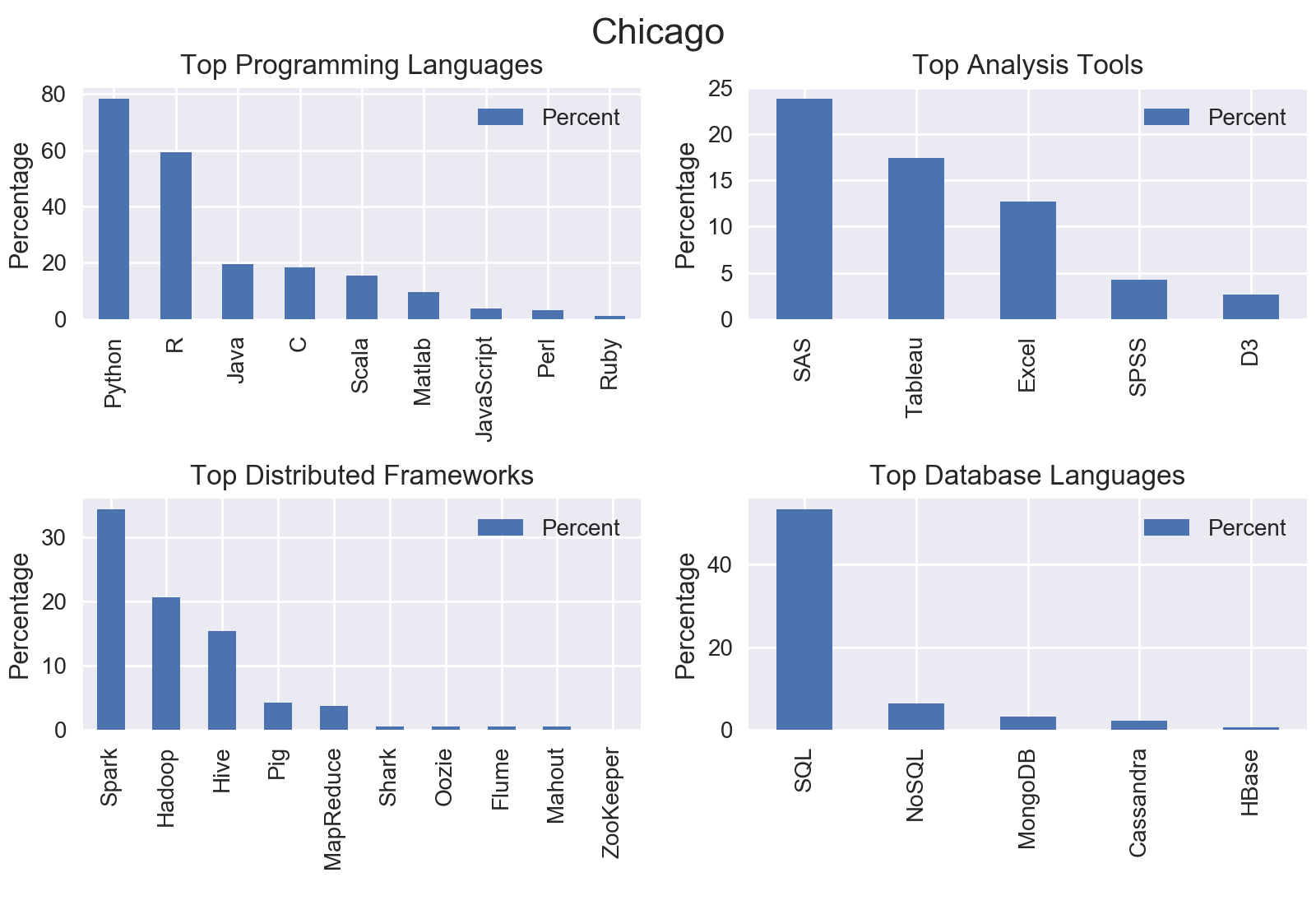
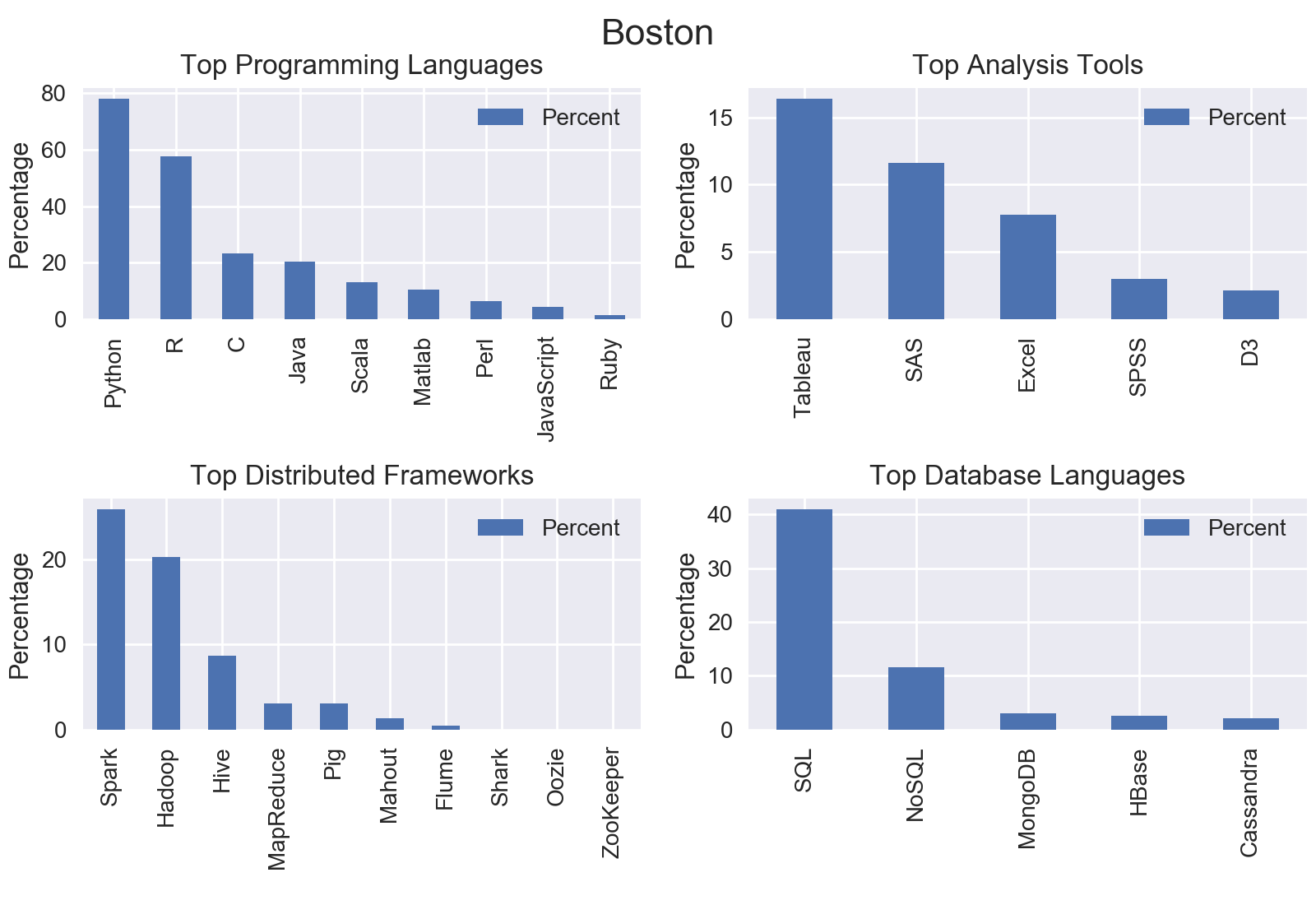
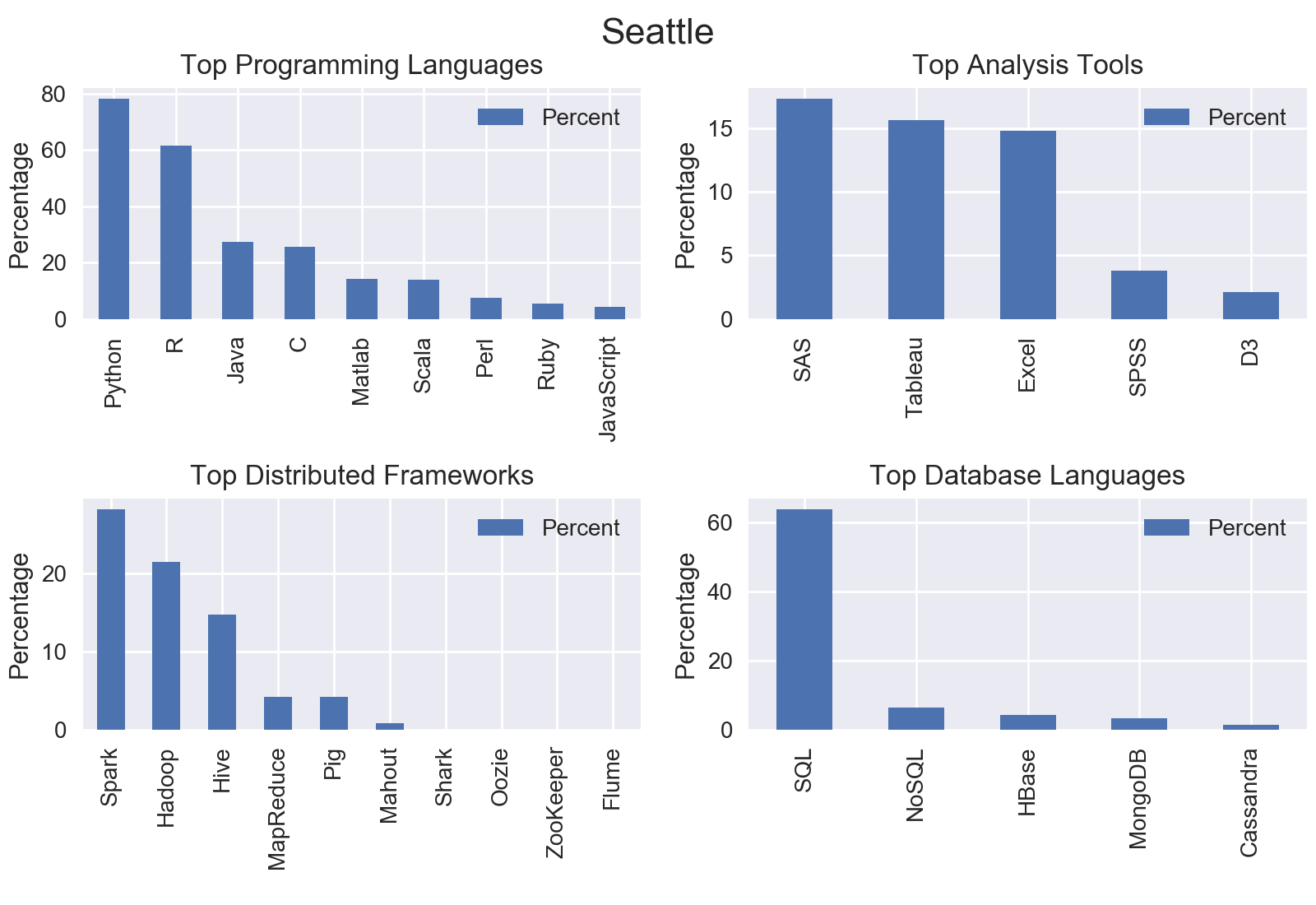
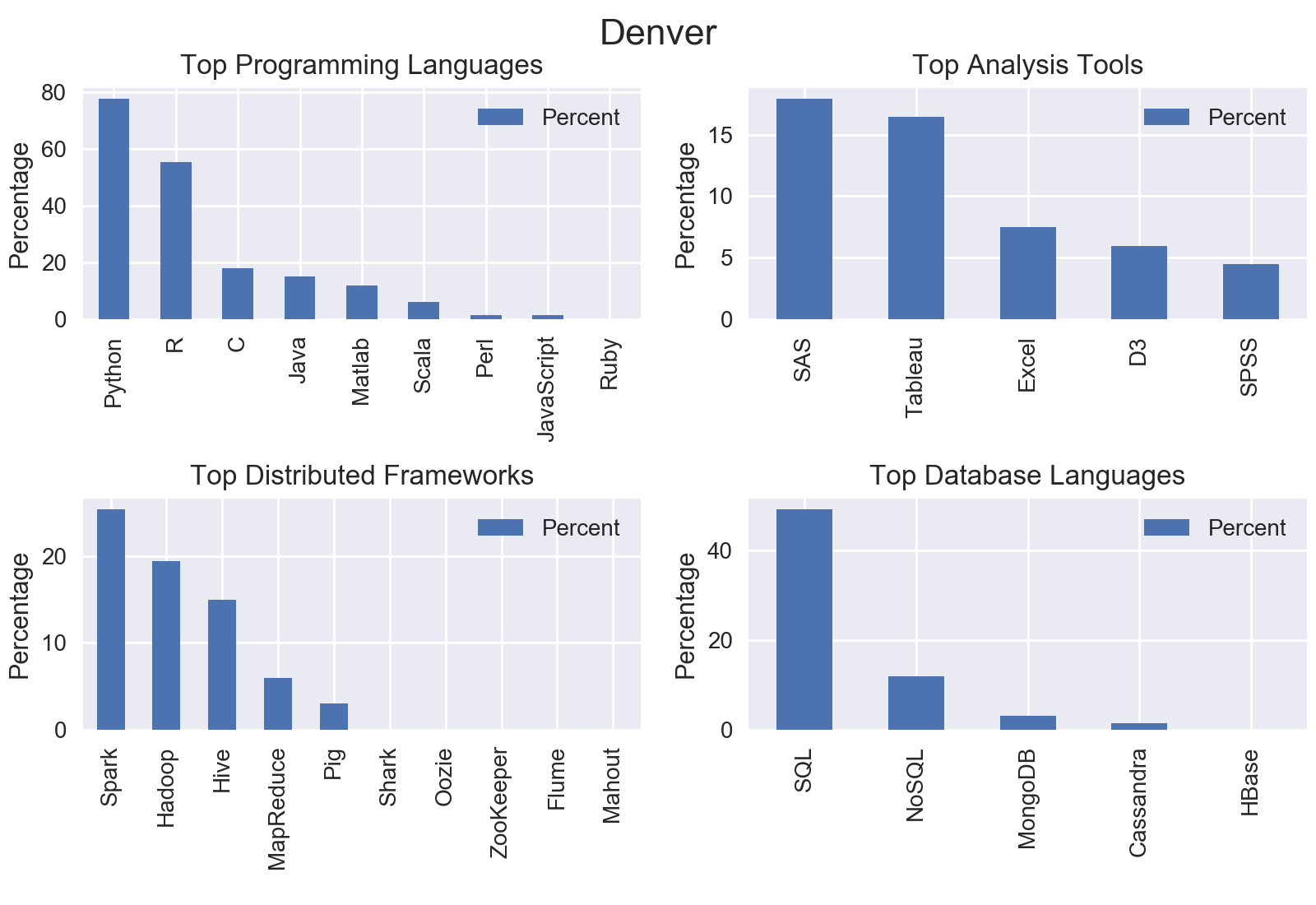
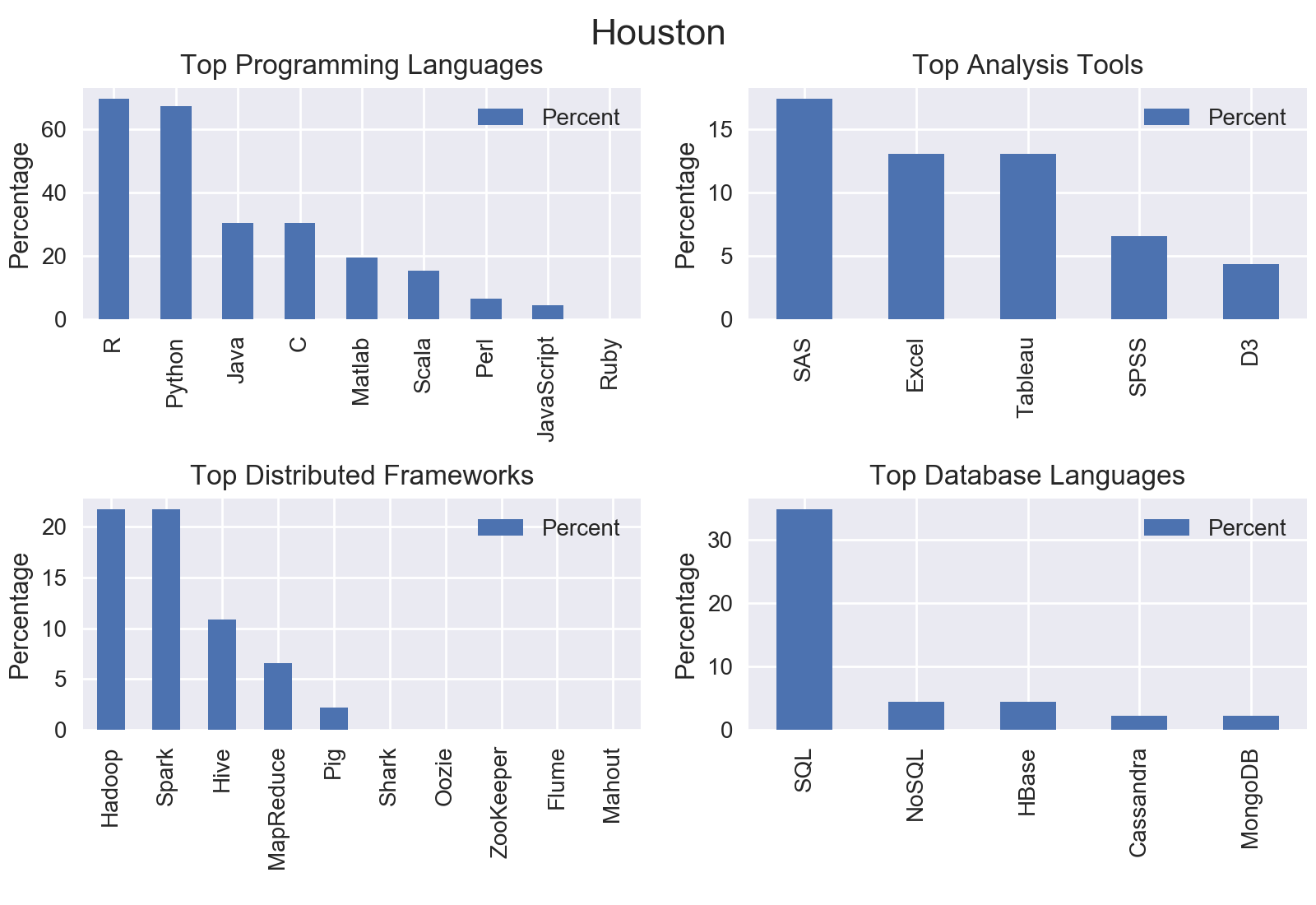
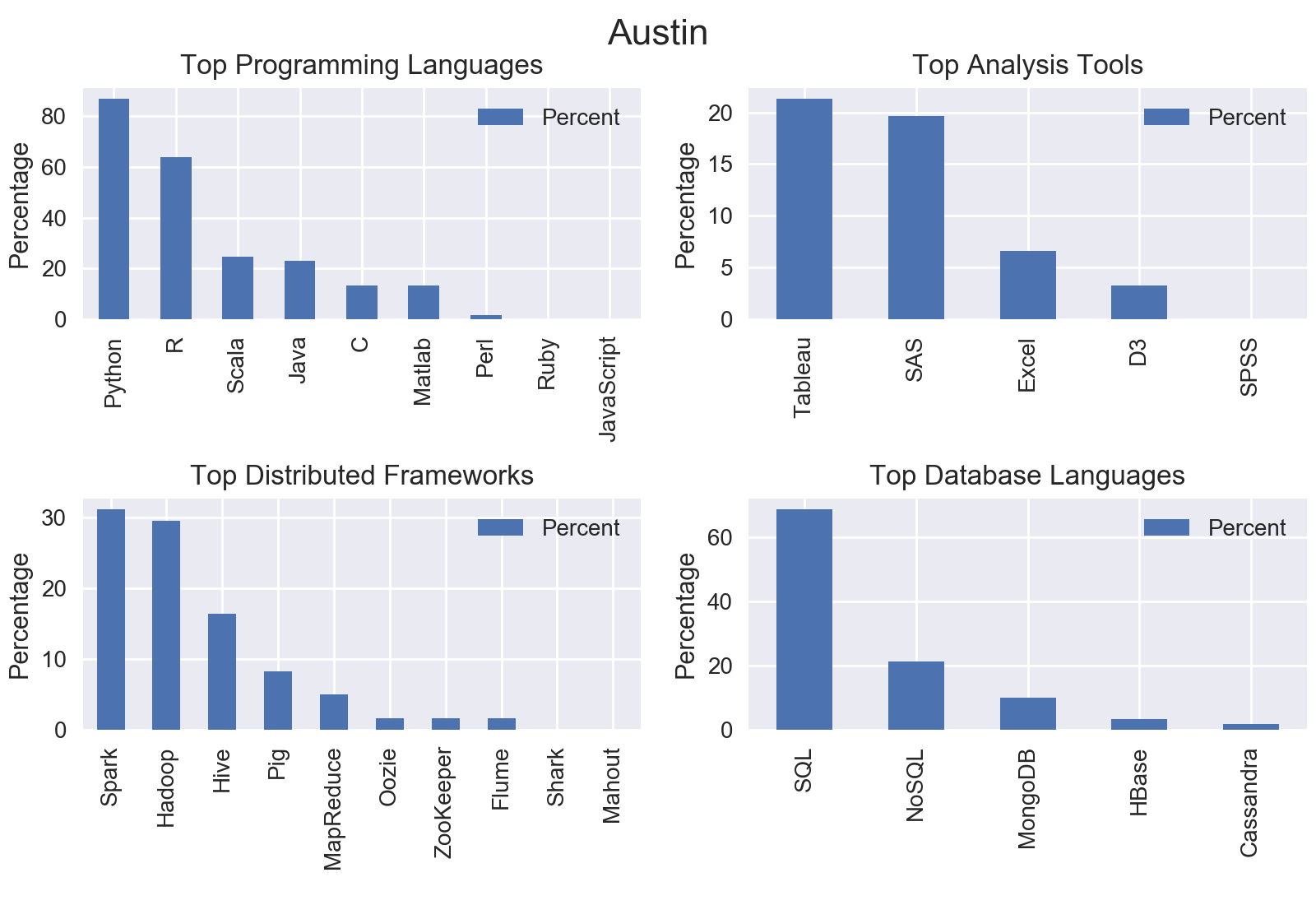
I mined all data science jobs on Indeed for the following locations: New York, San Francisco, Chicago, Boston, Seattle, Denver, Houston, and Houston. Included below are the graphs outputs for each city.
Nationwide
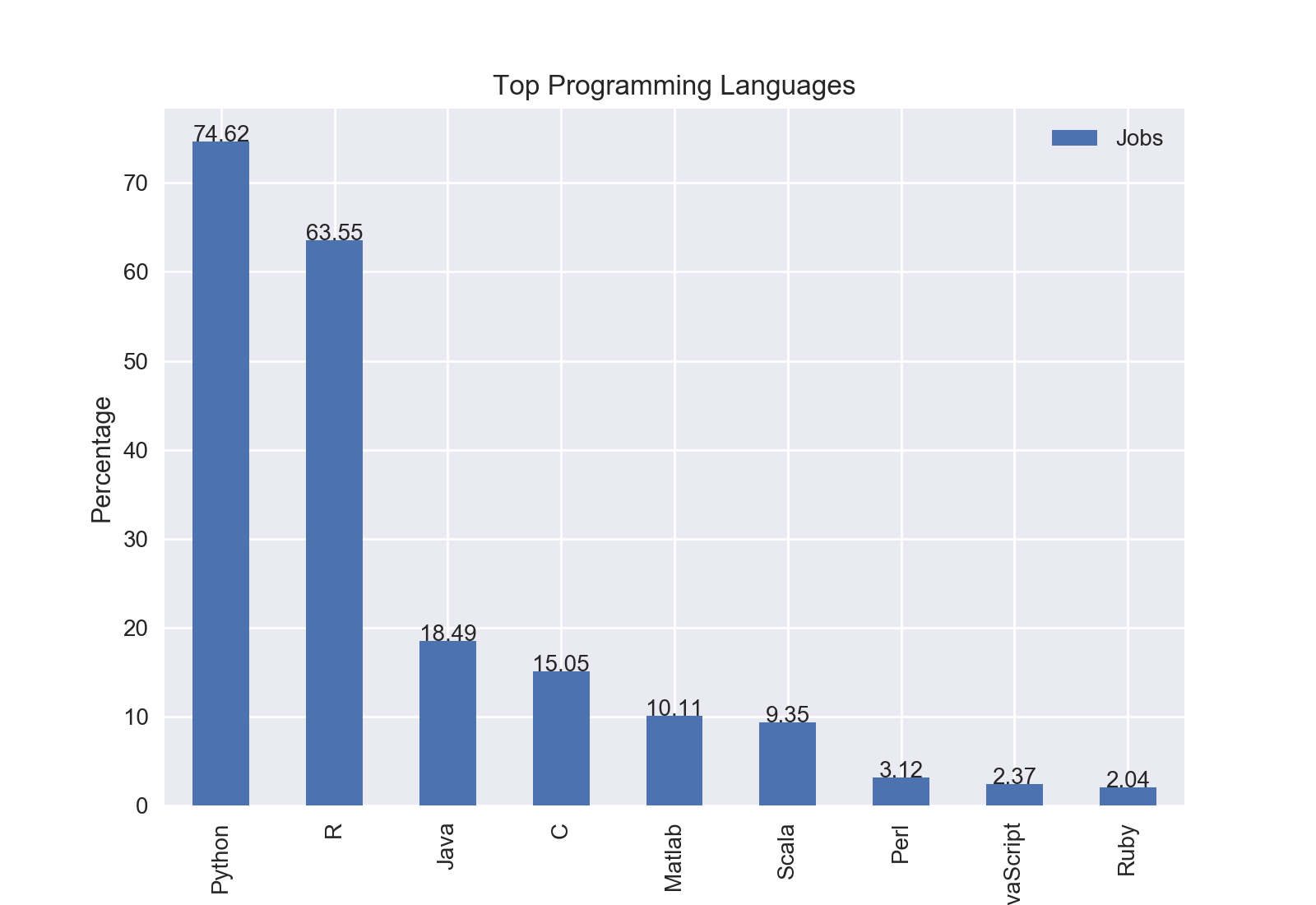
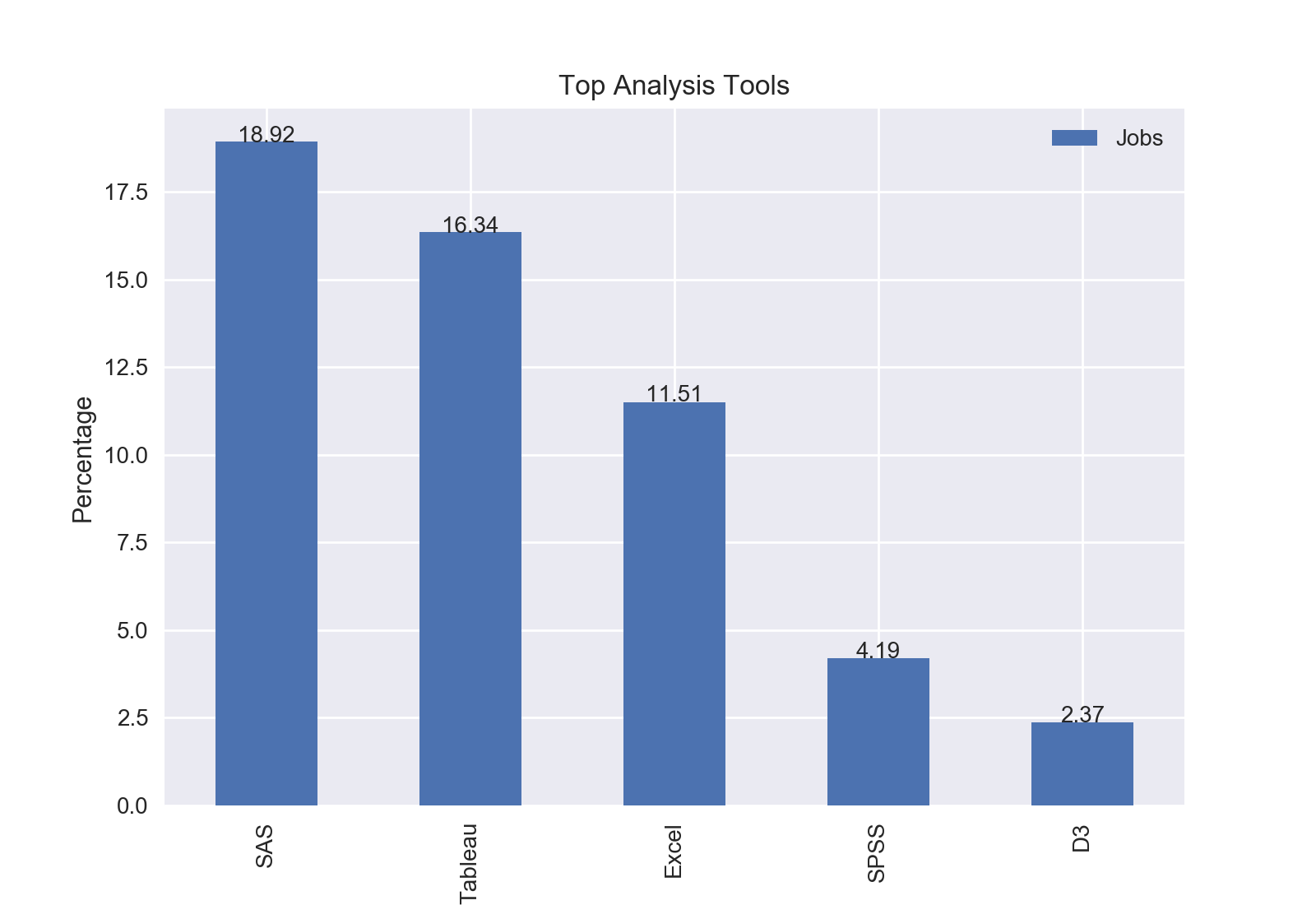
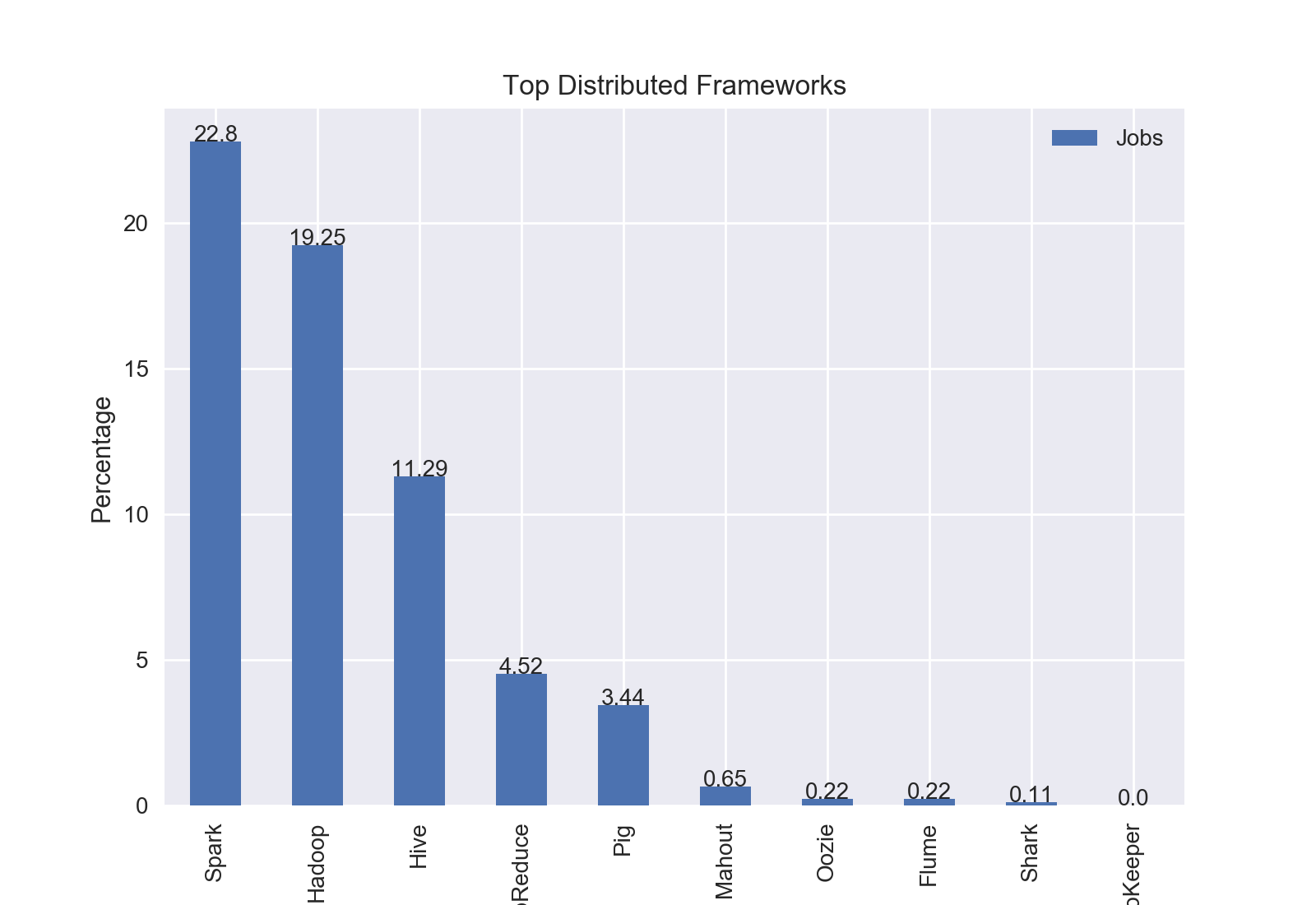
Following my analysis of specific cities, I was curious if the trends held true for the entire country. So, I mined all of the job postings containing “data scientist”.
Results
The top programming language was Python with nearly three quarters of jobs including Python.
The top analysis tool was SAS with 18.92% of jobs including SAS.
The top distributed computing framework was Apache Spark with 22.8% of jobs including Spark.
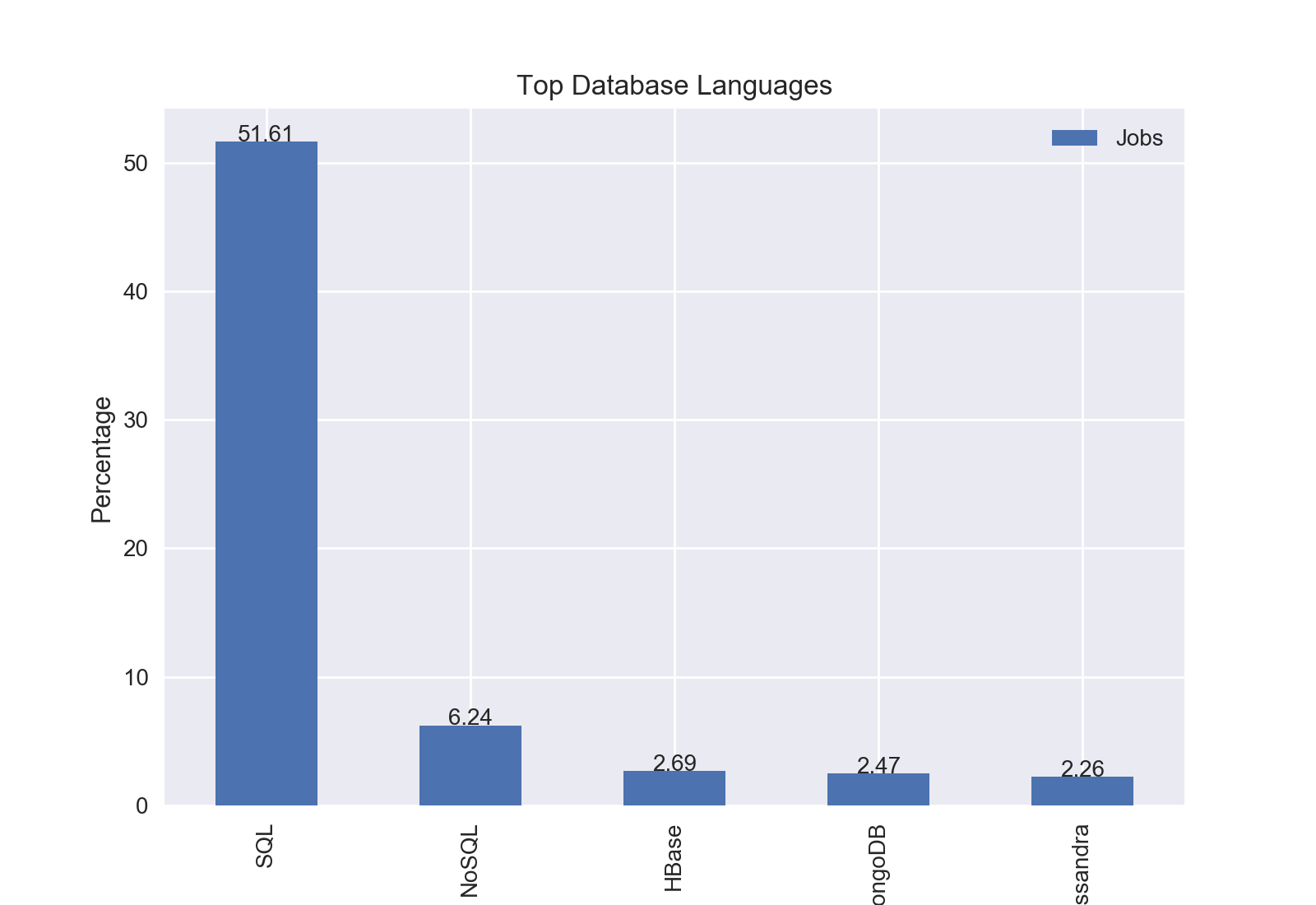
The top database language was SQL with 51.61% of jobs including SQL.
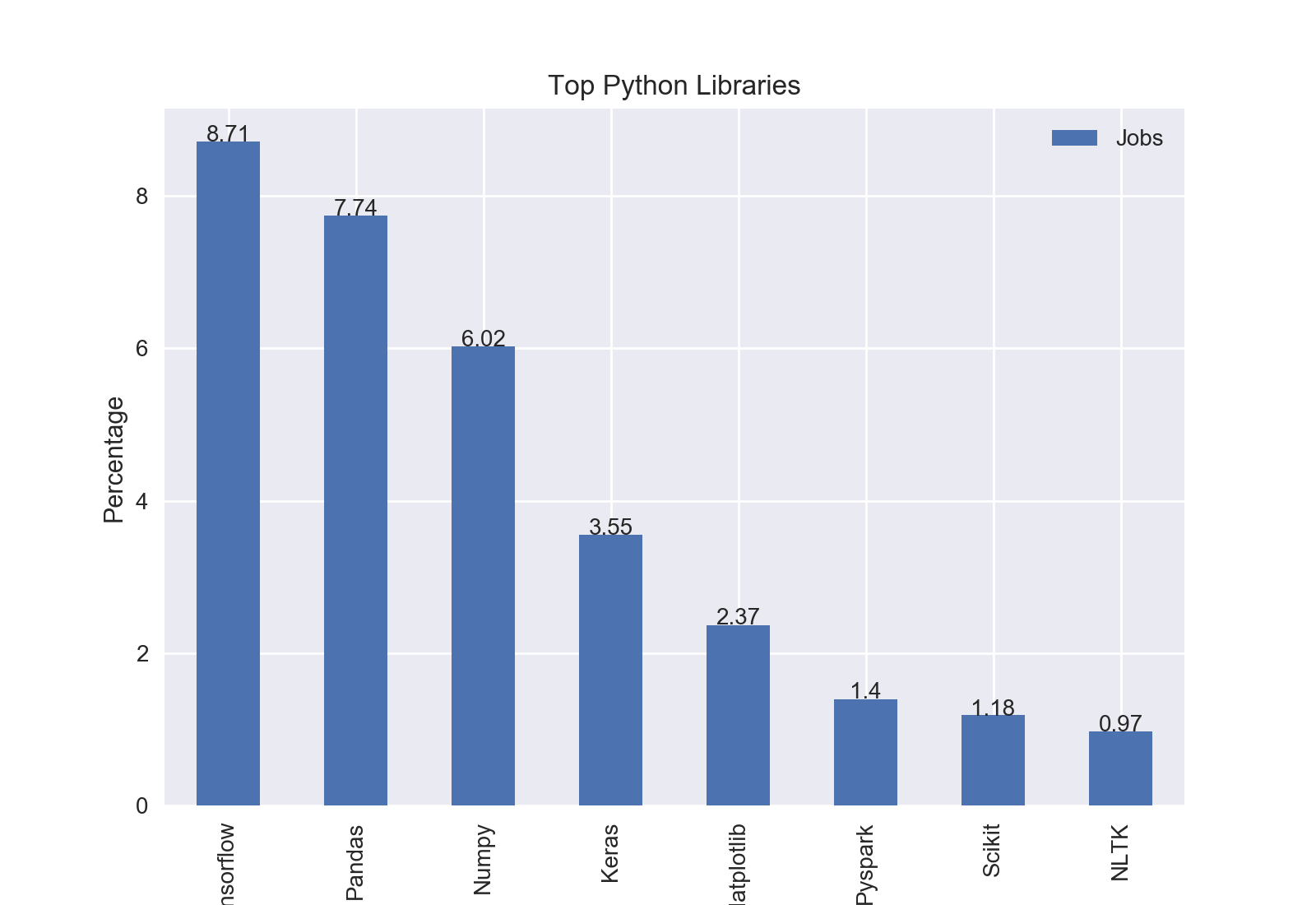
The top Python library was Tensorflow with 8.71% of jobs including Tensorflow.